How to call without a SIM card? Best calling apps for you
Last Updated
Oct 21, 2026
Published On
May 18, 2026
 189
189
Table of Contents
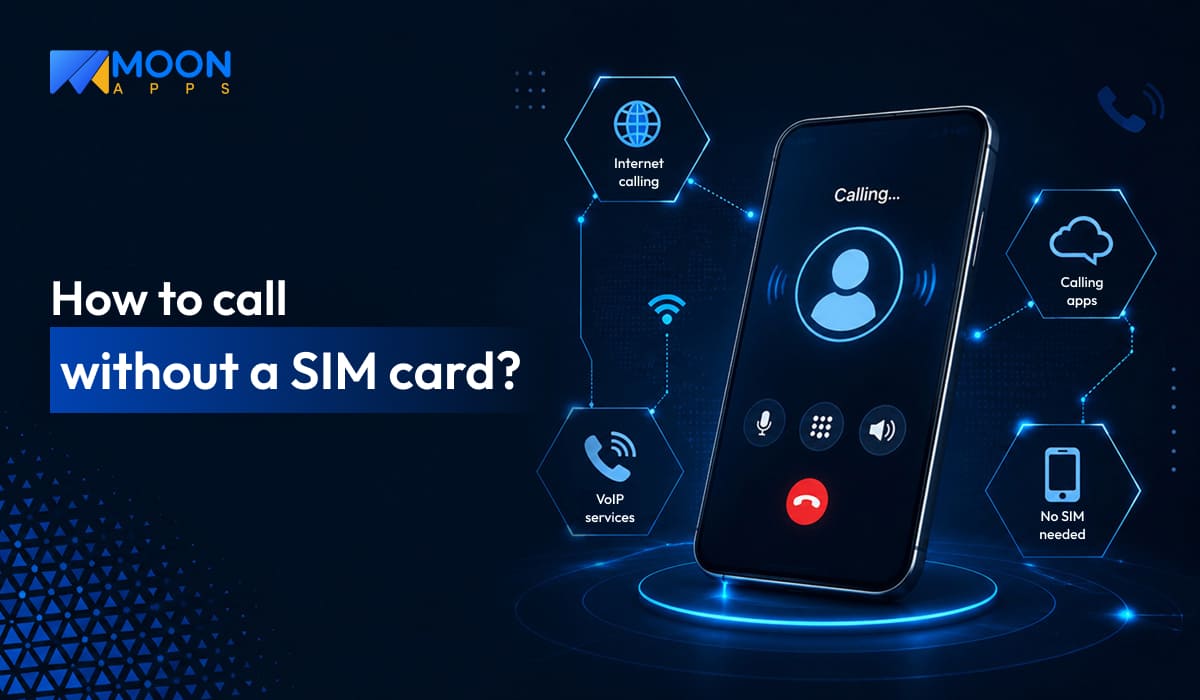
If you are curious, can you call without a SIM card? The answer is Yes!
Calling without a SIM card sounds unusual, but it’s becoming a common part of today’s digital world.
According to a report by SQ Magazine, the VoIP market is projected to reach $415.20 billion by 2034. More than 60% of US companies have switched to VoIP.
There are several circumstances, such as traveling abroad, when your SIM doesn’t work properly. Apart from it, your SIM card might get damaged, or you want to make cost-effective calls.
This is where SIM-free calling is a part of your communication. Using the internet, Wi-Fi, or VoIP apps, you can make a call without relying on a SIM card. These technologies provide great alternatives for staying connected from anywhere, at any time.
So, exactly how to call without a SIM card?
In this guide, you will explore the best methods of making SIM-free calls and unlock the best WiFi calling apps. These applications help you make budget-friendly calls and enjoy seamless communication worldwide.
📌 Key takeaways
- SIM-free calling needs a stable internet connection for uninterrupted communication.
- Calling without a SIM offers a flexible and convenient way to stay connected from anywhere.
- WhatsApp, Google Voice, and Skype are popular apps that allow voice and video calls from anywhere in the world.
- Users can make emergency calls without a SIM card.
- During traveling abroad, the SIM-free calling method is useful in avoiding roaming charges.
What does calling without a SIM card mean?
Calls without a SIM card simply mean making the call without using the physical SIM card or traditional cellular network. In this type of calling, calls are made over the internet, Wi-Fi, or VoIP (Voice over Internet Protocol) instead of using mobile towers.
In short, SIM card-free calling refers to calls made over mobile data, Wi-Fi, or a hotspot via VoIP technology or other supporting calling apps.
SIM-free calling is commonly useful when traveling to other countries or for those seeking cost-effective communication.
How to call without a SIM card? Here are the methods
You can easily make calls over the internet without a SIM card, using devices like smartphones, laptops, or tablets. Here are the ways to make the call without the SIM card:
1. Using an eSIM
An eSIM, also known as an embedded SIM, is pre-installed in smartphones and tablets. That is, instead of a physical SIM card, it exists in digital form that you can activate by downloading the carrier profile or scanning the QR code.
An eSIM, like a physical SIM card, connects your device to the mobile network for calls and mobile data. Without removing or inserting your SIM card, you can switch between the carriers.
2. Wi-Fi calling
It is another method you can choose to call without a SIM. Allows users to make or receive calls over Wi-Fi instead of using the traditional cellular service. It uses an internet connection to establish communication. On many modern devices, enabling Wi-Fi calling lets you automatically switch to it when Wi-Fi is available.
3. Using VoIP technology
Voice over Internet Protocol, or VoIP, enables making and receiving calls over an internet connection. This communication can be via Wi-Fi, mobile data, or a hotspot. Thus, it lets you get a SIM-free call.
It is useful for personal and business purposes, mainly for companies making international calls. You can make VoIP calls using a VoIP app like Moon Dialer, which offers unlimited high-quality international calls at an affordable cost.
4. Use an internet-based calling service
Internet-based calling apps such as Microsoft Teams and Facebook Messenger are another great alternative to SIM-free calls. By downloading these applications, you can enjoy seamless communication.
However, one limitation of these apps is that both the sender and the recipient must use the same platform. For instance, if a person is making a call over Microsoft Teams, then the receiver can only communicate while using it.
Important fact
Always update your apps to access the latest features and improved versions for better service.
Popular calling apps to make SIM-free phone calls from anywhere
1. Moon Dialer
Moon Dialer is an easy-to-use VoIP calling application. It enables you to make an inexpensive unlimited international call without inserting your SIM card, using your phone number as the caller ID. With this VoIP calling application, you can make cost-effective calls for everyday personal and business calls.
Beyond making calls, you can manage your day-to-day calls by recording, forwarding, or scheduling them. Get high-quality, secure Wi-Fi calling without a SIM card on Android, iOS, and Windows.
Moon Dialer is a complete one-to-one solution for managing your calls. It offers a great internet calling experience with all advanced features and secure communication. Thus, it supports business growth by simplifying your everyday communication.
Standout features
- Call via QR code – Create your QR code and share it with your contacts. Receive a call without displaying the number.
- iCloud Sync – Easily sync iCloud from anywhere, anytime. Access the data easily on an Apple device once synchronization is complete.
- Auto call scheduler – Automatically schedule your calls at a predefined date and time. Thus, you can save time by scheduling your outbound calls.
- Unlimited call recording – Record unlimited domestic and international calls without worrying about storage. Store and access the complete history whenever required.
- Auto-dialing – Automate your calls and reduce manual effort to reach your contacts. Especially designed for recruiters and sales teams to handle most outgoing calls.
- No roaming charges – No roaming fees applicable to international calling. Highly ideal for business professionals dealing with cross-border communication.
- Syncs with the contact app – Manage your contacts directly through syncs without manual work, saving time and speeding up the process.
- Third-party app support – Simplify your communication by integrating with popular apps like WhatsApp and Skype.
- Import contacts from CSV – Manage your bulk contacts in one place. Easily import all contacts from the CSV file in a minute from multiple sources, including Wi-Fi or Dropbox.
- Manage disposition – Do you handle multiple customer calls? Streamline your call management with our manage disposition feature.
- Effortless call log management – Easily track your past communication through filtering your call logs by date, name, or status.
Don’t let your international calls drain your money
Get affordable SIM-free calling with Moon Dialer. Easy to use, effective in calling.
Download It Free
2. Google Voice
Developed by Google, Google Voice is a cloud-based calling service that lets you make calls without a SIM card. Apart from making calls, you can send text messages and leave voicemail. For all these purposes, it provides a virtual number commonly known as a Google Voice number.
It also supports VoIP, allowing you to communicate from anywhere in the world. It easily integrates with Google Workspace applications. Users can easily access their communication history across iPhones and Android devices.
It is commonly useful for freelancers and other professionals who make international calls, either personal or business-oriented.
Standout features
- High quality voice calling
- Wi-Fi and mobile data calling
- Unlimited US texting
- Multi-device support
- Group messaging
- Spam call filtering
- Voicemail transaction
- Call forwarding across multiple devices
3. Burner: 2nd Phone Number Line
Burner lets you create a secondary phone number. You can use this phone number to call or text. It simply means you can communicate without sharing your private phone number.
This app allows you to create multiple numbers and keep them for as long as required, then dispose of them when no longer needed. You can even name those numbers to keep the right track of their purpose. The application is primarily useful for online sales to improve work-life balance.
Standout features
- Unlimited texting and calling
- Disposable phone numbers as secondary phone numbers
- Secure internet calling and messaging
- Do not disturb mode
- Custom voicemail
- Third-party integration
4. TextNow
TextNow is another good solution for a second phone number. This application is widely useful for personal and professional purposes, allowing you to make SIM-free calls or send texts over the internet.
This platform lets you port your existing number. Additionally, you can choose the local phone numbers from the various area codes. The application is widely used by freelancers, small business owners, and travelers looking for budget-friendly calling.
Standout features
- Unlimited calling, SMS, direct message, picture, & video messenger
- Wi-Fi and VoIP calling support
- International calling across 230+ countries
- Passcode for safe texting and calling
- Customizable free text tones
- Caller ID to identify the caller
- Sync text across devices
5. Dingtone
Dingtone, another popular calling app, supports Wi-Fi calling and lets you make calls without relying on a traditional cellular service. It also provides a second phone number for real calls, SMS, and voicemail.
It is widely used by business professionals who deal with international clients. You can easily send or receive calls without a physical SIM card.
Standout features
- Multiple numbers on one device
- Call recording
- Call blocking
- Call forwarding
- Conference calling and group messaging
- Cross-device support
- Privacy protection
- Free text messaging
6. Text Free
Text Free is a free texting and calling app that lets users make calls using their real phone numbers over the internet. This app supports MMS, allowing you to send photos, videos, emojis, and GIFs. Therefore, it allows you to send complete multimedia messages over the internet.
It offers cost-effective communication. This application is quite useful for remote workers, travelers, and businesses.
Standout features
- Voicemail support
- Group messaging and MMS
- International calling options
- Multi-device syncing
- Voicemail with custom greetings
- Call forwarding support
- 24/7 support
The difference between traditional and SIM-free calling
The main difference between traditional and SIM-free calling lies in the use of the internet. Here are the major differences between the two calling methods:
| Aspect | Traditional calling | SIM-free calling |
|---|---|---|
| Network type | It uses a cellular network for calling. | It uses the internet or digital technology instead of a physical SIM. |
| Internet use | It doesn’t use the internet for regular calls. | It needs a stable internet connection. |
| SIM card requirement | A physical SIM card is required for making calls. | Instead of a SIM card, it uses Wi-Fi, eSIM, or VoIP apps for calling. |
| Call method | It connects through the telecom towers. | It connects through an internet-based application. |
| Roaming charges | International roaming charges are applicable. | Roaming charges are usually not applicable. |
| Call quality | Higher with a strong network/phone signal strength. | Higher with a good internet connection. |
| Device compatibility | Works well with almost all mobile phones. | It needs modern smartphones and eSIM-compatible devices. |
| Best for | It is ideal for daily calling, generally for personal use. | It is ideal for international calling, travel, and temporary numbers. |
What things to look for when choosing the right SIM-free calling provider?
While choosing the right SIM-free calling provider, you must be careful about some of the factors explained below:
Features
Always look for the essential features when choosing the SIM-free calling provider. Choose the one that offers automation and advanced features, such as auto-scheduling and auto-dialing. This will save your time and enhance your overall experience.
Multi-device synchronization
This feature allows users to access the same calling account across multiple devices while keeping contacts, calls, and call history synced in real time. Thus, you can seamlessly communicate without a SIM card across smartphones, desktops, and tablets. There is no chance of data loss.
Integration
A third-party integration feature allows you to enhance your workflow. It also leads to better communication and team collaboration from a single platform. Moreover, integration reduces the need to buy separate software, helps save money, and enables a smooth flow.
Security compliance
It is one of the most important factors that you must not ignore at any cost. Always look for the service provider that offers encrypted calling, secure login methods, and spam blocking to prevent unwanted calls. This security compliance is necessary for business calls.
Cost
Analyze the service provider’s costs, as they are another important factor when choosing a SIM-free calling service provider. You must check for the monthly subscription charge and hidden charges. A lower-cost plan always offers fewer features, so you must ensure it aligns with your needs.
Enhance your SIM-free calling experience
Choose Moon Dialer to handle your business calls, contacts, and communication seamlessly from a single application.
Get the App Now
Final words
A SIM-free call is a good option if you handle international clients or other bulk sales and recruitment calls. It allows you to make cost-effective cross-border calls without relying on traditional SIM-based communication. There are multiple reliable solutions for making calls without a SIM. However, you must choose the one that aligns with your requirements.
Moon Dialer helps to streamline the international calling experience. Many global businesses are already improving their communication with this app. So ready to enhance your business calls? Try Moon Dialer now!
FAQs
Yes, you can call without a SIM card using an internet connection. There are several ways to make SIM-free calls, including eSIM technology, internet-based calling apps, and VoIP apps like Moon Dialer.
Yes, it is possible to receive a call without a SIM card, just as you can make a SIM-free call via eSIM, VoIP apps, or Wi-Fi. However, a strong internet connection is required.
Yes, both SIM-based and SIM-free calling can be made without Wi-Fi. For a SIM-free call, you can still make a call without Wi-Fi if you have an internet connection from another source, such as a hotspot or mobile data.
Moon Dialer is one of the best VoIP calling applications as it allows unlimited calls without a SIM card. Businesses serving overseas clients and sales teams can set up affordable international calling. Additionally, this application offers advanced features, including unlimited call recording, an auto-dialer, call scheduling, and call forwarding.
Yes, you can make an emergency call without a SIM card as long as your device is on a cellular network. Once you dial an emergency services number, the phone automatically connects to the nearest available network.
Share Article: